See the Full Presentation
Listen to the Presentation
Mesh Networking for Amateur Radio Operators
An Introduction to MeshCore, LoRa, and Modern Off-Grid Messaging
Fred Barrett – K7FMB
Kitsap County Amateur Radio Club
Photo courtesy of MarliMillerPhoto.com
Speaker Notes
What I want to introduce today is a somewhat different form of radio communications than most of what we normally talk about at the club.
We are familiar with voice, HF, repeaters and digital modes. MeshCore and Meshtastic take inexpensive, very low-power radios and use them to build networks primarily for short digital messages.
We'll be talking about mesh technology in general; however, you will find that I'm going to concentrate mostly on MeshCore tonight because that's where we're seeing substantial activity locally, but I'll also explain Meshtastic and some important differences between the two.
When My Phone Says “No Service”, Can I Still Exchange Messages?
Mesh networking can change the assumption.
Speaker Notes
I got motivated with these technologies as part of family emergency planning, and trying to solve the basic problem when my phone says “No Service.” Can I still exchange text messages with somebody?
Obviously, as amateur radio operators, our first reaction is “Of course I can communicate—I have radios.” But, if you're like my family, not everyone unfortunately has a ham license.
But what if I specifically want the convenience of texting? No cell tower, no Wi-Fi access point, and no Internet connection. That's the problem these systems address.
Amateur Radio Already Solves Many Problems
| Need | Existing Solution |
|---|---|
| Voice Communication | FM, SSB, DMR, Fusion, D-STAR |
| Long-distance Messaging | HF |
| Position Reporting | APRS |
| Formal Message Handling | Winlink |
| Local Coverage | Repeaters |
| Digital Experimentation | Packet, VARA, FT8, etc. |
Speaker Notes
This technology isn't intended to replace anything on this list.
We already have outstanding tools. FM for local voice. HF when we need distance. APRS for position reporting. Winlink for formal messaging. Repeaters for extending local coverage.
Amateur radio has historically evolved by adding capabilities rather than throwing the old ones away.
Mesh networking gives us another one: lightweight, asynchronous digital messaging, particularly over local and regional distances.
The first ingredient that makes this practical is the radio technology.
Who is LoRa?
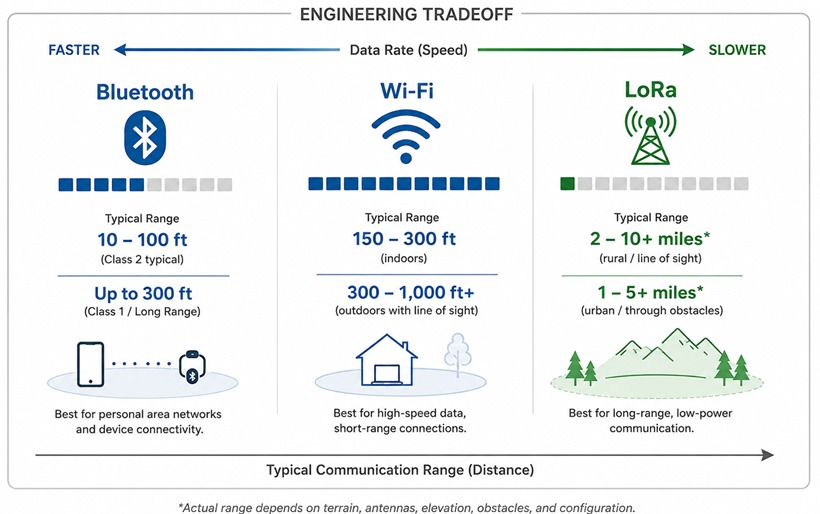
- Designed for distance, not speed
- Extremely low-power consumption
- Receiver sensitivities approaching -140 dBm, well below the FM noise floor
- Specifically engineered for long-range digital communications
Speaker Notes
LoRa stands for Long Range. And the important thing to understand is that it makes a very deliberate engineering tradeoff.
We're giving up data rate in exchange for range, receiver sensitivity and very low power consumption.
Wi-Fi is enormously faster than LoRa. That's exactly what we want when we're moving megabytes or streaming video.
But a MeshCore message might only say “Leaving work, ETA home 17:30.” We don't need megabits per second for that.
The interesting number for a radio operator is receiver sensitivity. Depending on the LoRa configuration and hardware, we're talking about sensitivities approaching -140 dBm. That's an extraordinary link budget for a little radio that can run from a battery.
So don't think of this as slow Wi-Fi. It's solving a completely different RF problem.
ISM – Industrial, Scientific, & Medical – 915 MHz / 868 MHz / 433 MHz
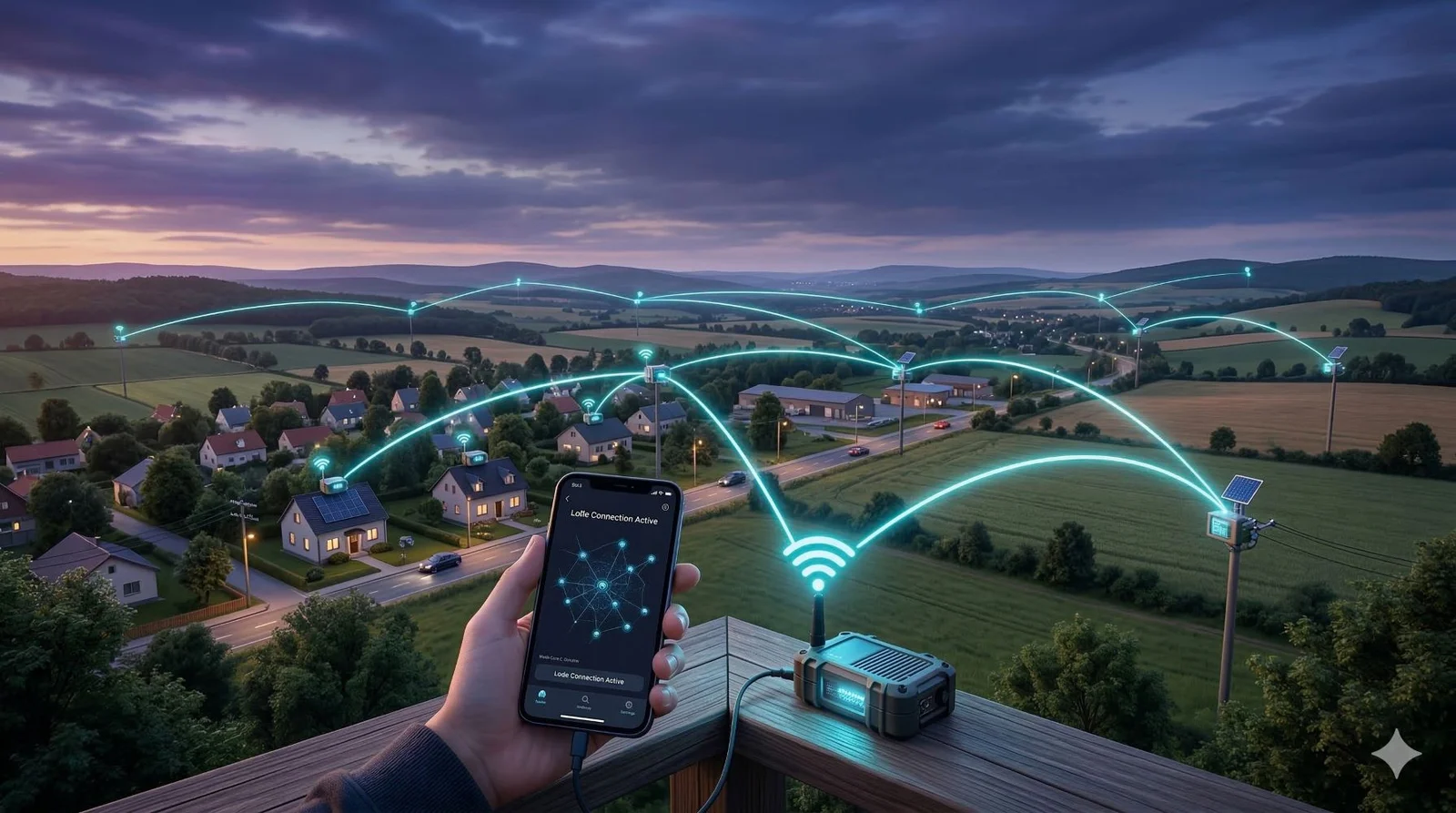
Photo courtesy of jrattechworks.com
What is a Mesh Network?
A mesh network is a collection of independent radios that cooperate to move messages from one device to another.
Unlike a repeater system:
- There is no single required relay
- Messages may travel through multiple intermediate nodes
- Multiple paths may exist between sender and receiver
- As the network grows, coverage can improve
Every participating node has the potential to extend the network.
Speaker Notes
Now take those LoRa radios and let them cooperate.
Instead of requiring my radio to reach the final recipient directly, another node can help move my message along.
Maybe I can reach this node, it can reach another node, and that node can reach the recipient.
The important conceptual difference from the repeaters we're accustomed to is that there doesn't have to be one particular central repeater that everybody must reach.
There can be multiple possible paths through the network.
More nodes can therefore improve the network—provided, of course, they're useful nodes in useful locations.
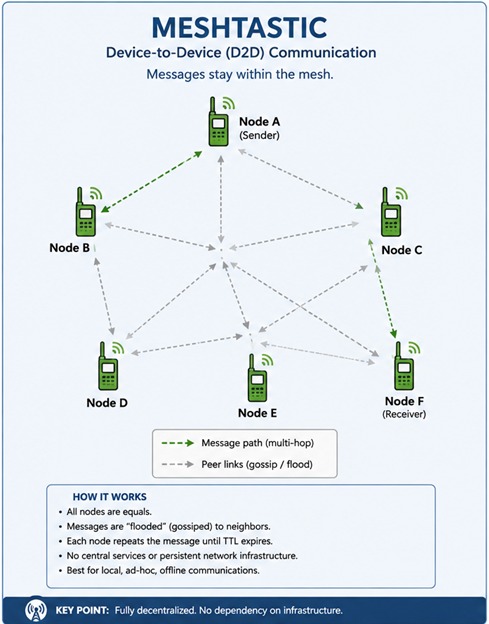
At a Glance

Speaker Notes
There are two major names you're going to encounter in this space: Meshtastic and MeshCore.
Two different systems, same general low-level hardware.
They both use LoRa, but they approach networking differently.
Meshtastic is fundamentally a peer mesh.
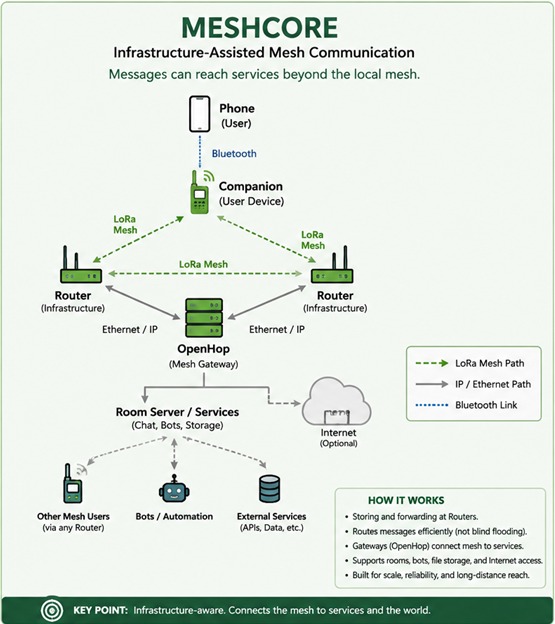
MeshCore has much more explicit roles. We can have companions for users, repeaters whose job is infrastructure, and services such as room servers and message bots.
Neither architecture is inherently "the right way." They're different design decisions for different goals.
MeshCore vs Meshtastic
| MeshCore | Meshtastic | ||
|---|---|---|---|
| Philosophy | Lightweight, fast, reliable messaging | Feature-rich, open experimentation | |
| Primary Focus | Text messaging & communication | Sensors, telemetry & communications | |
| User Experience | Simple, intuitive, fast to use | More options, more configuration | |
| Ecosystem | Strong in PNW, active local community | Large global community | |
| Best For | Everyday messaging, emergency comms, community networks | Telemetry, IoT, experimentation, tracking |
Speaker Notes
Here's something to note because both systems use LoRa: MeshCore and Meshtastic cannot talk to each other. MeshCore and Meshtastic share similar RF technology, but they are separate ecosystems and are not interoperable. A MeshCore node cannot exchange messages with a Meshtastic node.
Think DMR and System Fusion. Both are digital radio technologies, but that doesn't mean a DMR radio can have a Fusion QSO.
They use different packet formats. They use different network protocols. They use different routing philosophies. They use different application-layer messaging. There is no over-the-air interoperability between them. However, many of the devices can be programmed for either technology.
Meshtastic has a larger global ecosystem and emphasizes experimentation, telemetry and a wide range of configuration options. MeshCore is particularly focused on efficient messaging and infrastructure-assisted networks.
For us, one important practical difference is what happens to be deployed around here.
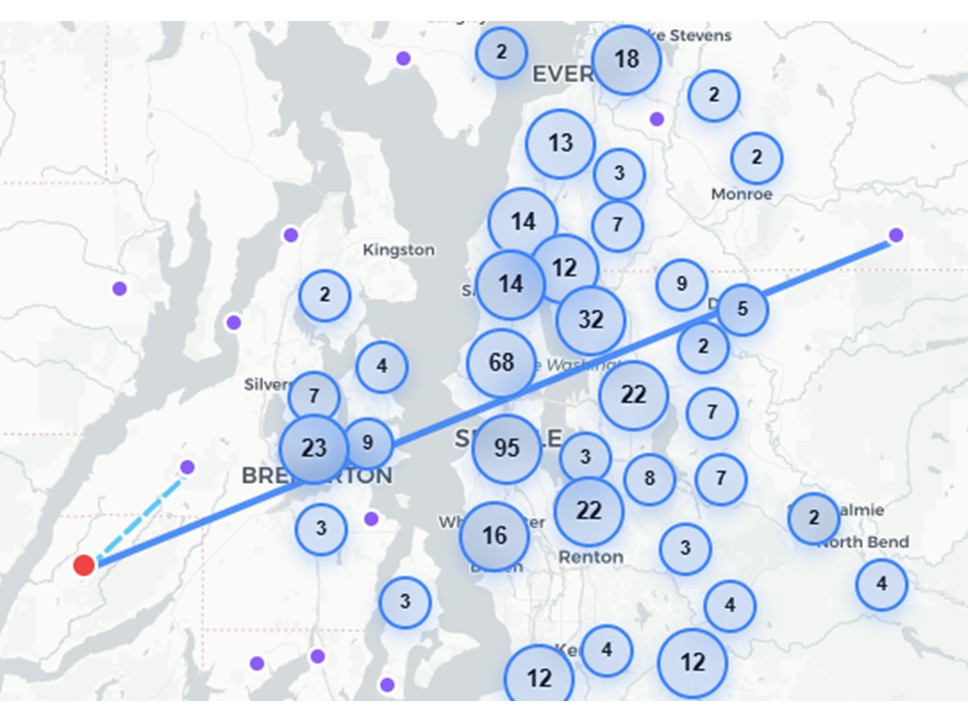
Meshtastic Coverage
Map: meshmap.net
Speaker Notes
Here's the Meshtastic activity visible in our region.
MeshCore Coverage
Map: map.meshcore.io
Speaker Notes
And here's MeshCore.
That is one of the primary reasons I'm concentrating on MeshCore today. It isn't an argument that one protocol is technically superior to the other. It's a network-effect argument.
A radio network becomes much more useful when there are other radios to communicate through.
The Network at a Glance
Node Types
- Base Station
- Chat Node
- Repeater
- Room Server
- Hybrid Node
Route Types
- Direct
- Transport Direct
- Flood
- Transport Flood
1,210 nodes visible
Speaker Notes
Now let's zoom out and look at what this means as a network rather than just dots on a map.
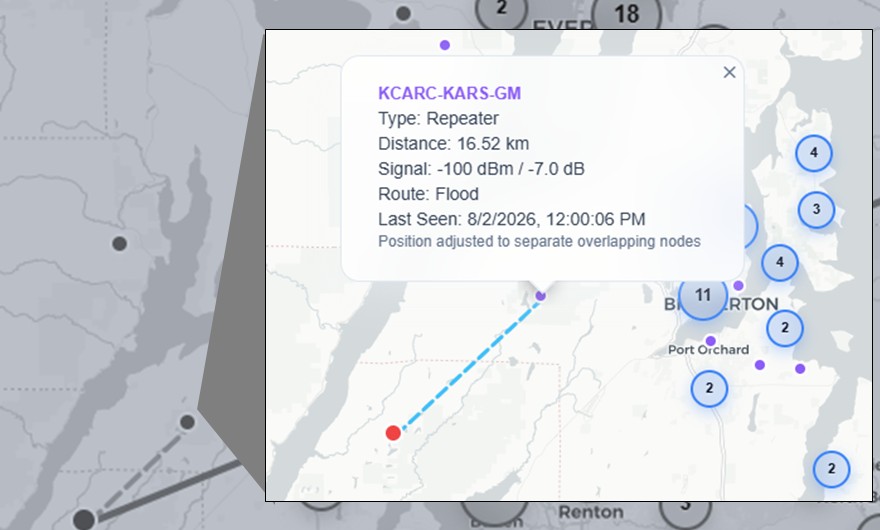
Not Just Theory
Our Own Node in the Network
That's the club's own KCARC/KARS repeater, already live on the map from the last slide. This isn't a future plan — it's part of the regional infrastructure today.
KCARC-KARS-GM · Repeater
16.52 km away · Flood route
Speaker Notes
And here's one that should look familiar.
That's our own KCARC/KARS repeater. So this isn't future fantasy. Our club is already participating in the regional infrastructure.
LoRa at UHF frequencies is not strongly affected by ionospheric propagation, but it is still subject to environmental RF conditions. Heavy precipitation, foliage, terrain, atmospheric moisture, and especially temperature inversions or tropospheric ducting can affect signal strength and range.
In practice, LoRa propagation is generally more predictable than HF, but it is not immune to changing propagation conditions.
Key Terms
MeshCore Vocabulary
Common terms you'll hear in the MeshCore ecosystem
Node
A device that takes part in the mesh network. That can be your own device or a repeater at a fixed location.
Companion
The small device you use to read and send messages. You usually pair it with your phone or computer.
Repeater
A node that helps move messages further through the network. That's how the network can cover more area — think Gold Mountain.
Room Server
An extra role some groups use for shared conversations or group communication — similar to a BBS (Bulletin Board System).
Antenna
The antenna sends and receives the radio signals. A good antenna, placed high and clear of obstructions, greatly improves range and reliability.
BLE
Bluetooth Low Energy. This is the wireless connection between your companion and your phone.
Key Point: MeshCore uses these building blocks to create a powerful, resilient, and easy-to-use mesh communication network.
Speaker Notes
There are six MeshCore terms worth knowing.
A node is simply anything participating in the network.
A companion is normally your personal radio—the device paired by Bluetooth to your phone.
A repeater is infrastructure. Its job is to move everybody's traffic farther, which is of course analogous to the KCARC Gold Mountain Repeaters.
A room server provides shared conversations—a little like the BBS concept many of us remember from packet.
The antenna is still the antenna. LoRa has not repealed the laws of physics.
And BLE is Bluetooth Low Energy—the short-range link between your phone and companion.
Emergency Communications
Left of Boom, Right of Boom
Communications diversity: amateur radio remains the regional layer, GMRS covers neighborhood and community traffic, and mesh sits between them for low-power digital messaging and local situational awareness. None of these needs to replace another.
Left of Boom
Preparedness & Early Detection
Mission: Build communication redundancy that detects weak signals early, stabilizes information flow, and prevents cascading failures.
Neighborhood Layer — Family Radio Service (FRS)
- Standardized neighborhood channel (FRS/GMRS Ch. 3).
- Early detection: downed limbs, blocked roads, minor outages.
- Rapid hyper-local reporting to CERT (if available) or EMA function.
- Ideal for households, seniors, and low-tech users.
Community Layer — General Mobile Radio Service (GMRS)
- GMRS repeater watchstanders during storm approach.
- Pre-incident coordination: staging, VOAD support, shelter prep, resource positioning.
- Family-network readiness for medically vulnerable residents.
- Extends situational awareness across Newport County.
Mesh Layer — MeshCore / Meshtastic
- Self-healing, battery-powered digital network.
- Pre-storm telemetry: wind, pressure, air quality, grid anomalies.
- Distributed sensors → early warning before official outage notices.
- Ideal for CERT field teams and EOC technical units.
Regional Layer — Amateur Radio (Ham)
- HF/VHF situational awareness from statewide AUXCOMM.
- Winlink pre-incident ICS forms (weather, surge, shelter status).
- Intelligence flow when commercial networks degrade.
- Can link Newport County towns to RI EMA, hospitals, and regional partners.
Right of Boom
Response & Continuity
Mission: Preserve communication density after impact to accelerate response, maintain continuity, and shorten recovery time.
Neighborhood Layer — FRS
- Immediate welfare checks (elderly, medically dependent).
- Local coordination: water points, debris clearing, warming/cooling sites.
- “Are you OK?” traffic for rapid triage.
- Works even when power and cell networks fail.
Community Layer — GMRS
- CERT field team coordination (damage assessment, resource requests).
- Neighborhood → EOC relay when cellular LTE/Wi-Fi are down.
- Tactical comms for shelters, DPW, fire stations.
- Supports distributed leadership during outages.
Mesh Layer — MeshCore / Meshtastic
- Digital encrypted messaging when LTE/Wi-Fi are down.
- Structured packets: location, sensor data, status reports.
- Real-time community situational awareness map option.
- Ideal for grid-down coordination across neighborhoods.
Regional Layer — Amateur Radio (Ham)
- HF/VHF continuity to RI EMA, hospitals, and regional partners.
- Winlink RMS Post Office mode → RF-only email for EOC continuity.
- Tactical VHF/UHF for shelters, hospitals, and field units.
- Provides long-range resilience when all else fails.
Left-of-Boom Doctrine Principles
- Fail Safer: Assume communications will break; build layers that survive.
- Speed: Fast reporting prevents cascading failures.
- Redundancy: Many nodes, many paths, no single point of failure.
- Practice the Bad Day: Regular CERT/EMA/EOC drills using all layers.
Right-of-Boom Doctrine Principles
- Communication Density: More nodes = faster recovery.
- Continuity: Keep information flowing — both ways — even in degraded conditions.
- Interdependence Awareness: Power, communications, and logistics are linked — but communications must stand alone.
- Accelerated Recovery: Communication drives resource allocation and stabilization.
“The Devil Never Sleeps: Learning to Live in an Age of Disasters,” by Juliette Kayyem
Speaker Notes
I do want to spend one minute on emergency communications because a few of us here work with KARS and Kitsap DEM. Ben Flanig (KJ7LAE) introduced me to this great graphic.
The interesting idea here is communications diversity.
Amateur radio remains our regional communications layer. GMRS may provide neighborhood or community communications. Mesh can sit between those layers providing low-power digital messaging and local situational awareness.
None of these needs to replace another.
For the Cascadia planning problem, that's valuable because resilience comes from having multiple independent communications paths—not betting everything on one technology.
The Hardware Landscape
Lots of Devices
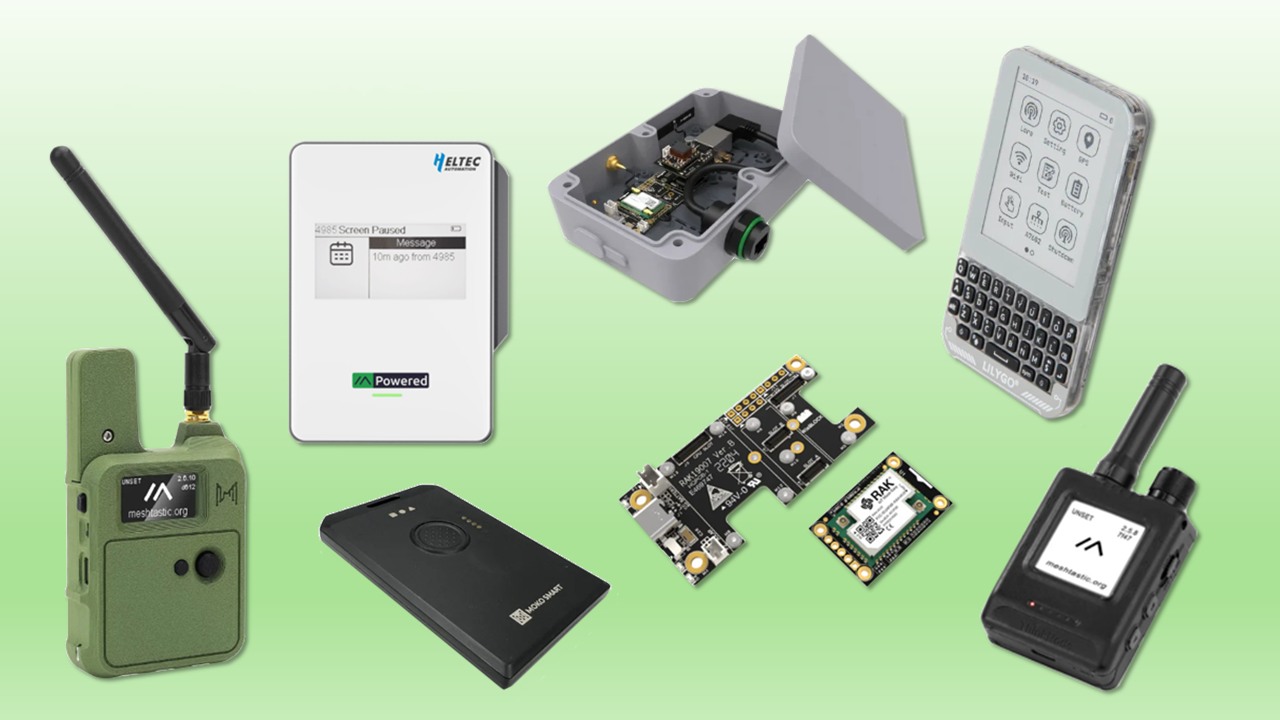
MeshCore isn't one particular radio. There's an ecosystem ranging from bare development boards to fully packaged handheld companions — some with GNSS, some with screens, some essentially headless radios meant to live in a box.
Speaker Notes
And this is where things get dangerous for amateur radio operators—there are gadgets.
From bare bones and dev kits, to full standalone product.
MeshCore isn't one particular radio. There's an ecosystem ranging from bare development boards to completely packaged handheld companions.
This is the N37. This is a ThinkNode. Here's a Heltec-based device. And here is the LilyGo.
Some have GNSS. Some have screens. Some are essentially headless radios intended to live in a box. The important part is that the hardware role and the software role are separate decisions.
Apps for Android, iPhone and PC/Mac
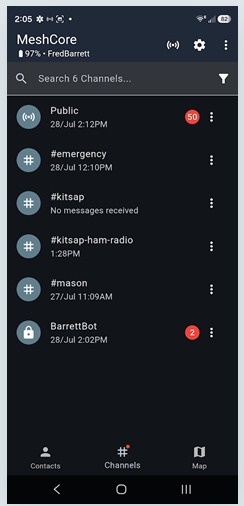
Channels
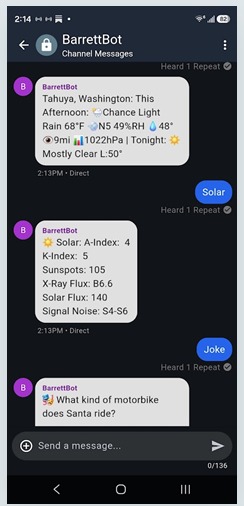
Direct Messages
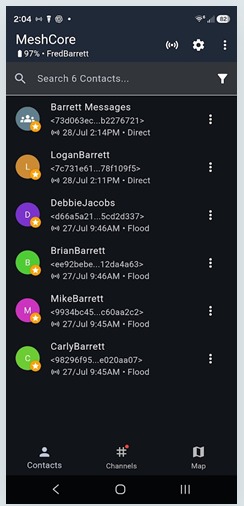
Contacts
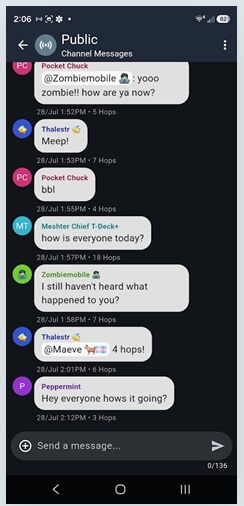
Public Channel
Speaker Notes
For a companion, the radio isn't normally where you type the message. Your phone is the user interface.
The companion talks to the phone over BLE. The phone gives you contacts, channels, conversations, node information and configuration.
There are clients for Android and iPhone, and desktop options as well.
And remember our opening slide: the phone doesn't need cellular service to do this. Bluetooth gets the message to the LoRa radio.
Live Demo
Let's Just Show You
Speaker Notes
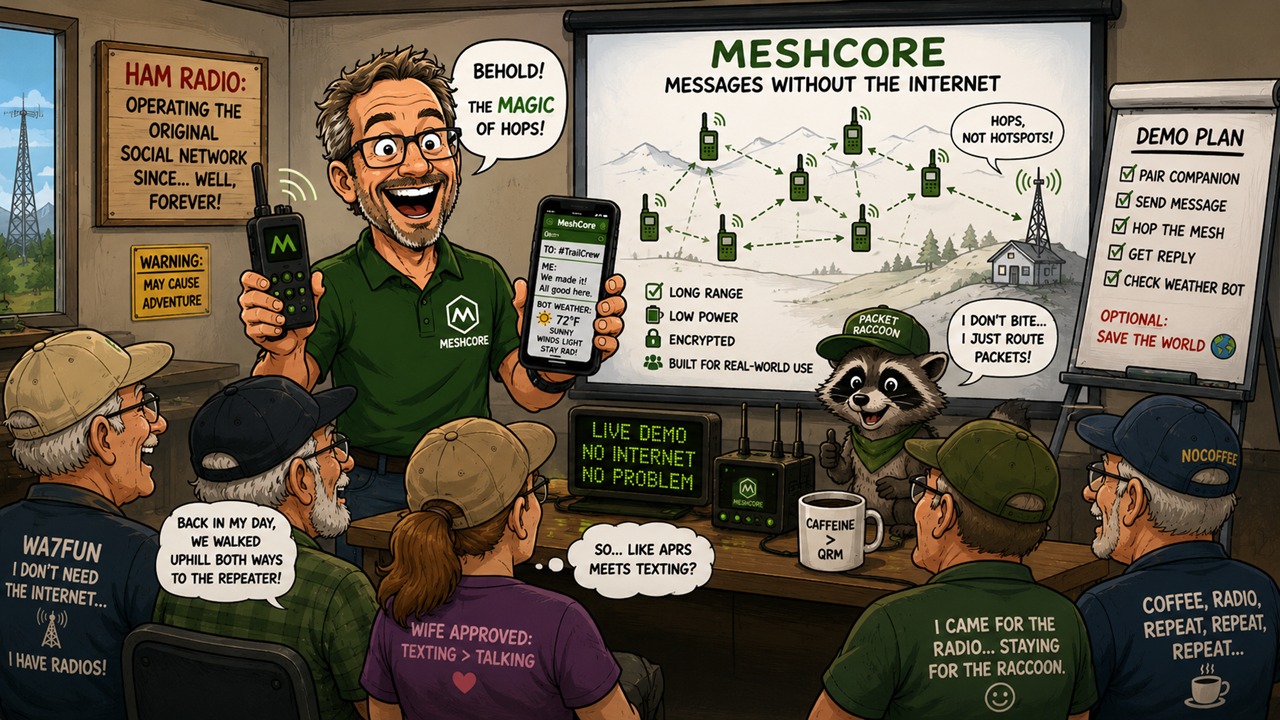
Rather than put another architecture diagram on the screen, let's actually do it.
I'm putting the phone in airplane mode. Cellular is gone. Wi-Fi is gone. I'm leaving Bluetooth enabled because that's how the phone communicates with the companion.
That message just left the phone over Bluetooth, entered the LoRa network, and was delivered without using the cellular network or the Internet.
Try It Yourself
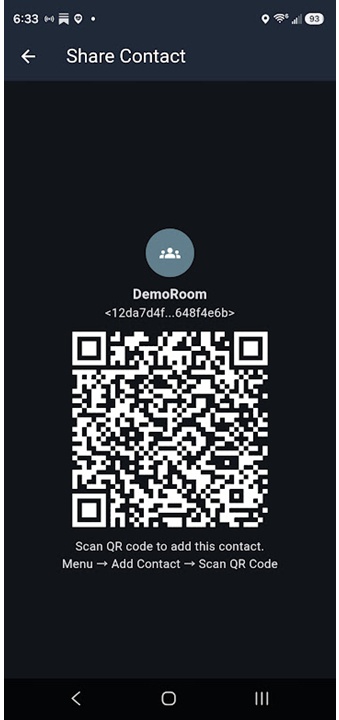
Join DemoRoom
I am hosting (at the time of this being published) a MeshCore room server, DemoRoom, in North Mason County. If you already have a MeshCore-compatible device, open the app, go to Menu → Add Contact → Scan QR Code, and point it at the code below.
MeshCore Resources
If you remember only two, start with the official MeshCore site and the MeshCore map — the map is particularly interesting since you can see the network around you before buying anything.
- MeshCore Official Site – meshcore.io
- MeshCore Map – map.meshcore.io/
- Semtech LoRa – semtech.com/lora
- Meshtastic Official Site – meshtastic.org/
- Meshtastic Map – meshmap.net
- Rokland Mesh Store – store.rokland.com
- RAK Wireless – rakwireless.com
- Seeed Studio – seeedstudio.com
Speaker Notes
I've put the useful starting points here. If you remember only two, start with the official MeshCore site and the MeshCore map.
The map is particularly interesting because you can see the network around you before buying anything.
I've also included Meshtastic because I encourage you to look at both systems.

Questions?
So, back to the question I started with: if my phone says “No Service,” can I still exchange messages? The answer is yes — as long as we give the phone another radio network to use. That's fundamentally what MeshCore gives us.
Let's keep the conversation going in the club Discord, in the #all-things-mesh channel.
Join the Discord →Speaker Notes
So, back to the question I started with: if my phone says “No Service,” can I still exchange messages?
The answer is yes—as long as we give the phone another radio network to use.
That's fundamentally what MeshCore gives us.
Invite people to ask questions and keep the conversation going in the club Discord. There's a section called “all-things-mesh” — https://discord.gg/H2ezWpva